Copyright © 2012 Gecko Software, Inc., All Rights Reserved.
Questions & Answers Stock Market Trading Futures Market Trading
TradeMiner Accumulating Wealth One Tic At A Time
more info more info
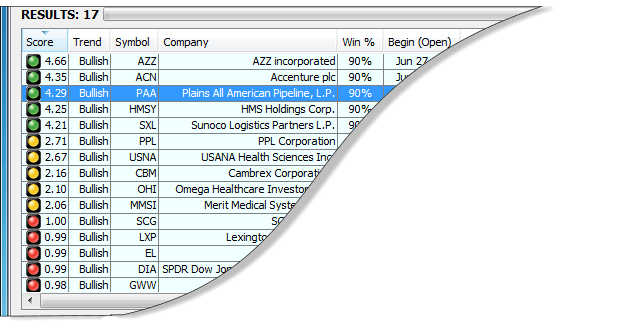
Knowledge Base Question:  Do I have to spend any money to get started? Answer:  We're so confident that your going to LOVE Trading with TradeMiner, that we give you a complete 30-Day money back satisfaction guarantee, plus, we give you everything you need to get started, including free "How To Get Started Videos" plus a free trial of our Track ‘n Trade Trading Platform which includes 30-days of free access to all three financial markets, Stocks, Futures & Forex. Question: What computer and operating system does TradeMiner run on? Answer: TradeMiner was designed in a language known as Java, therefore any platform, including PC, Mac or Linux that runs the Java work environment can run TradeMiner.  (Make sure you have the latest version of Java.) The more memory you have, and the faster your computers CPU, the more efficient your TradeMiner environment will be. Question:  How much is the data service? Answer:  TradeMiner does not have a monthly data service fee.  Gecko Software has created a unique 3D data cube, which is the container for the market data.  All the data necessary to use TradeMiner is included within the 3D Datacube that loads after you install the software. Each year, we will contact you to see if you would like to update your 3D data cube with the new years trades.  If you do choose to upgrade your data cube, there will be a minimal fee of $69.00 each version. Question:  What markets are included in TradeMiner? Answer: Stocks Version: S&P500, NASDAQ 100, the DOW Industrials, and many popular ETF’s. (These are all the very best stocks with high volume, and options trading capabilities.) Futures Version: Almost every single commodity you can imagine, from all the major US exchanges. Forex Version: The top 24 commonly traded currency pairs. Question:  Am I correct in thinking that all you have to do to trade using TradeMiner is to Open your position on the open of the specified “buy” day, and close your position at the close of the specified “sell” day, and then hold stops at the recommended “stop” location? Answer:  I guess the most basic of all trading strategies would be as you mentioned, to simply buy on open, sell on close, and hold stops at the suggested area, but that's not really how TradeMiner was truly intended to be used.  That’s akin to saying, “buy every time my Stochastics indicator gives me a buy signal, and sell every time it gives me a sell signal.”  We all know that’s a very poor trading strategy, even though the Stochastics indicator is one of the best technical indicators ever created.  (Unfortunately, that’s how most automated EA systems trade, since they can only see one half the trading formula.) TradeMiner is a fundamental tool, which points out areas in which markets have produced similar actions or activity over a period of time.  We here at Gecko Software believe that both the technical as well as the fundamental nature of markets is key to our overall long- term success.  Melding the two together is how we come up with a solid 1-2-3 knock out punch, and TradeMiner is only half of that formula; the fundamental half. TradeMiner was intended to provide traders with additional information on when markets have a tendency to repeat themselves, either bullish, bearish, or neutral, and then use that historical/fundamental knowledge and information to make better trading decision, based on current technical, and fundamental elements of the trade. By solely relying on just one of these elements in isolation, whether that be fundamental or technical, is surely a recipe for losses; which is why we suggest using the fundamental information derived from TradeMiner to enhance your technical trading capabilities.  In essence, establishing a bullish or bearish bias to the market, prior to using your technical indicators to take long or short positions, and to use position sizing based on this additional information. The reason most trading robots lose money, is because they simply ignore this fundamental factor, and automatically, or ‘robotically,’ without foresight, take both long and short positions regardless of the historical underlying cycle, or true fundamental Bullish or Bearish nature of markets; it’s for this reason that we created TradeMiner, to open this information up, and to make it available to traders, so they're not blindly trading into fundamental Bullish or Bearish momentum that might be totally opposite of their “robotic” technical indicator or strategy. It’s only when both the historical and fundamental Bullish or Bearish cycle & trend of the market is matched with the corresponding technical trigger, and then followed by proper risk and money management strategies that we achieve our long-term successful trading goals.  To try and cut corners on any one of these three key elements is surely a short- sighted view of trading, and will no doubt eventually end in huge losses; as has been exampled by most publicly sold EA systems. Question:  Can I select a specific stock, commodity or Forex pair in TradeMiner to tell me when the best time of month or year to trade it? Answer:  Yes, you can specify any individual symbol that exists from within the lists mentioned above.  When you specify a specific symbol, TradeMiner will kick out the results for that symbol for all trades for the entire years time frame. TradeMiner was designed to find the right stock, the right Forex pair, or the right commodity to trade during a specified time.  The TradeMiner database includes all the very best markets, therefore if your favorite market does not show up during that time frame, then TradeMiner does not believe it is the “right” opportunity, but that there are better opportunities with a higher degree of possible success. Question: Is this just another one of those cheap EA's (Expert Advisor) Plug-ins to some other public domain software package? Answer: No, TradeMiner is a complete professional level “stand alone” market research tool, designed for serious individuals, corporations and hedge fund managers who are interested in making a life changing financial investment decision. This is the same tool used, over the past 10 years, by our very own professional market analysts to provide:  Trading magazine articles, paid newsletters, trading advisory services, headline news agency quotes, and TV spots. TradeMiner is not a simple plug-in to some public domain trading package, TradeMiner is a professional level analysis tool, created by industry experts, and a 19 year old corporate engineering firm and  team of computer programmers.  We provide toll free tech-support, free training webinars, and hundreds of hours of free online video education written and produced by professional traders in an effort to help our clients succeed in these amazing financial markets. Question: Do you have real, audited, registered track record for TradeMiner? Answer: TradeMiner is not a “formal trading system” traded under management, TradeMiner is a very powerful research tool that pinpoints where the historical trends and market cycles have occurred over time.  You can use that information however you see best. What I like to do is use TradeMiner to help me identify a stock, futures contract, or Forex pair that has been bullish/bearish during a specific time frame, and then use that information to help me make my technical trading decisions. Once I identify the right stock/futures/forex pair, I then start looking for a technical market entry trigger using my favorite indicator to go long/short around the beginning of the trend identified by TradeMiner, I then use general rules of technical analysis, risk and money management strategies to make the trade. Remember, past performance is not necessarily indicative of future results, but its the best indicator we've got.  Just make sure to continue using smart trading techniques, risk and money management strategies along with TradeMiner to help determine a historical trend bias. I hope that helps you understand how this tool was meant to be used. Question: How can TradeMiner help me?  I’m a day trader? Answer:  A good day trader will always establish the underlying overall long-term or fundamental trend or cycle of the market.  This is generally done by first looking at longer term trends from daily, or weekly charts.   Another tool often used to identify overall long- term trends is the COT (Commitment of Traders) in the Futures market.  The seasonal nature of markets has long been used to identify cycles and trends within the futures markets for day traders, but now, with TradeMiner, the task of identifying which markets cycle and trend during specific times of the month and year has now been made significantly easier, making the day traders job of identifying an overall long-term bias toward market direction a snap. Use the bullish or bearish nature of the cycle or trend from TradeMiner to establish your market directional bias.  If you receive a technical entry signal in the direction of the TradeMiner trend, take the trade, otherwise, consider hedging your bet. Question: What is the Score, how is it calculated, and how will it help me make better trades? Answer: Our Powerful NEW Score Ranking System was developed to help users quickly identify the best trading opportunities out of a list of highly probable trades. We've developed the Score to use a scale from zero to five, and given each rank a quick reference color coded key; red for avoid, yellow to approach with caution, and green for go for it! The math formula used to calculate these opportunities is a proprietary system based upon past market performance, future market expectations, and a number of other factors that help us make wise trading decisions. The scores three most important criteria are which markets make the most amount of money in the least amount of time, with the least amount of risk. Question: TradeMiner Forex lists entry and exit dates, but what time is being used for open and close? Answer: TradeMiner currently uses Eastern Standard Time (EST) and FXCM trading hours for it's open-close time. Although Forex doesn't close daily, 5pm(EST) is the chosen time for the daily close. You can expect to place your trades at 5pm(EST) to match with the entry and exit times shown within TradeMiner. Also Sunday evening opens at 5:15pm(EST) and Friday closes at 4:00pm(EST). Example: Entry on July 15th open and Exit on July 16th close. July 15th open is 5:00pm(EST) on July 15th. July 16th close is 5:00pm(EST) July the 17th.   Question: How long have you been in business?  Are you here today, and gone tomorrow? Answer: Gecko Software has been in business for over 19 years.  We recently received an award for being one of the top 25 software developers in our industry, and we fully expects to be around far into the future.  Gecko Software’s flagship product, Track 'n Trade, has also received Stocks & Commodities Magazine's Annual Readers Choice Award six times. Question:  How do I get started? Answer:  Click the "Add To Chart" button found on the Home Page of this website, and you'll be linked into a page where you can download your copy of the software.  Once you install the software, make sure to register, and watch the educational “How To” videos provided. Question:  How long will I have to wait? Answer:  There will be no waiting!  On the next page, after you fill in the form, you will be given a link to download the software so you can get started right away. Question:  Do I need to open an account with a broker? Answer:  No, it is not necessary that you open a trading account with any particular broker to use TradeMiner.  TradeMiner does not “execute” orders, it is a research tool, used by professional traders to help them refine their trading decisions.  TradeMiner is NOT a robot trading system, with TradeMiner, you are the trader, and TradeMiner feeds you the fundamental information that you need to make informed decisions.  You can continue to use your current broker while using TradeMiner, since TradeMiner is not connected to, and does not send orders to your broker.  TradeMiner wad developed to help you research the optimal trading opportunities, and the best times to trade each market, it is not a trading platform, and therefore is not tied to any one brokerage firm. Question: Do you offer software training classes? Answer: Yes, free live online classes are held every day by our technical support staff.  Once you've downloaded and installed the software, you'll receive an email invitation to join the free software training classes.  We also have trade mentoring available for those individuals who would like such a program. If you look in the Education Center, (Education Tab within TradeMiner) you can also register for free educational video lessons as well. Question: If I have any additional questions who do I call? Answer: For software/tech-support questions, call toll free: 1-800-862-7193, or call your personal account representative at the same 800 number, but select Extension 2
Minimum System Requirements 2 Gigs RAM 1 Gig Storage MS Windows, Mac OS Java
1-800-862-7193 TradeMiner: Accurately Identify Trends & Market Cycles, Stocks, Futures & Forex. Home Demo Video Affiliates Privacy Risk Contact Q&A Forum In The News Award! Trade Stocks & ETF's Trade Futures & Commodities Trade forex or foreign currency
Stocks
Futures
Forex
more info more info Q&A