
Copyright © 2012 Gecko Software, Inc., All Rights Reserved.
Stocks
Futures
Forex
Product: TradeMiner Review
Gecko Software, Inc.
271 N. Spring Creek Pkwy. Ste. A
Providence, UT. 84332 USA
Phone:
800-862-7193
Email:
gecko@geckosoftware.com
Website:
www.TradeMiner.com
Product:
TradeMiner, Software for finding seasonal
cycles, trends, and patterns in Stocks, Futures & Forex.
Requirements: WinXP/Vista/7/Mac OSX/Lynix
200 MB free hard disk space, 1024x768 screen
resolution (minimum) Larger recommended.
RAM 2GB (more is better). Requires Internet
connectivity for installation, but not to run the
application itself, CPU: 2.4 GHz or higher.
Price: $197.00 each version, Stocks, Futures & Forex,
no monthly fee, one time a year data cube update $69.00
each version.
--------------------------------------------------------------------
by Kent Kofoed, PitNews Magazine
--------------------------------------------------------------------
The TradeMiner software is available for Stocks,
Futures, and Forex, and the main premise of TradeMiner
is that markets tend to move in cycles and trends, with
these cycles and trends tending to repeat themselves
over time, and knowing how to recognize these trends,
understanding how they work, and paying attention to
when they are most likely to occur, will help any trader
make more informed trading decisions. Even though this
review focuses solely on TradeMiner for stocks, the
features of both the Futures and Forex TradeMiner
platforms are very similar so many of the features
mentioned here are included in those packages as well.
TradeMiner allows you to dig through years of historical
stock price data, of all of the stocks that are listed in the
S&P 500, the Dow 30, and the Nasdaq 100. In addition,
the software will sort though this data and help tell you
what to trade and when to trade it, with the
characteristics of the trade being specified by you. By
allowing you to easily analyze the historical price data
of these actively traded stocks you will be able to
quickly uncover cycles and trends that meet your search
criteria. The design of the software makes it easy to get
started and, after a short time, the easy-to-use format
allows you to navigate the software quickly and easily.
Even though the software does have a pretty basic
design, making it easy for anyone to use, it has
everything that is needed to quickly sort through large
amounts of data and uncover investment opportunities.
In addition to being very intuitive, the software is also
very user friendly. The data that you input is in
paragraph format, making it easy to key in your desired
search criteria. For example, a typical search would look
something like this (with the data in bold being the
criteria)… "Prospect for trades in the
Month of: April. Find trades that win at
least 95% of the time, showing Buy. List
trades that last at least 10 trading day(s),
but no more than 30 trading days. Mine at
least 15 years of history. Dig Now!" You
can "dig" through the data according to
which month you are looking to find
opportunities, what length of trading period
those opportunities should be, and what
type of order you are looking, as well as the
probability of
that trade being
a winning trade.
In addition to
looking for any
stock within a
certain month,
you can also
mine a specific
stock to find out
when the best
time to trade
that stock is,
historically.
There are two
basic steps to
the mining
process and
there are also
two basic
screens, which
includes the
"mine" tab and
the "portfolio"
tab. The "mine"
tab is where you
input your criteria, as shown in the previous example,
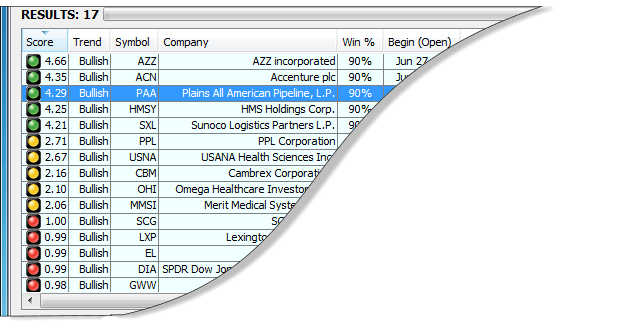
and where you get your results. The results are ranked
according to the individual score of each trade with the
best trades showing up first. You are able to sort the
results by the type of position you are looking to take
(i.e., buy or sell), the stock symbol of the trade, the
enter/exit dates of the trade, and many other important
trade characteristics. At the bottom of each tab you are
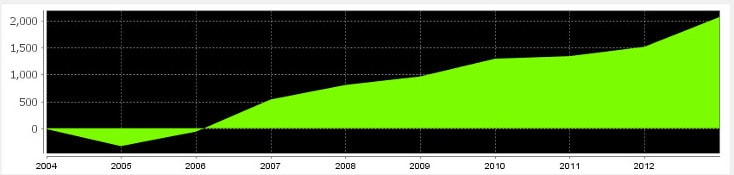
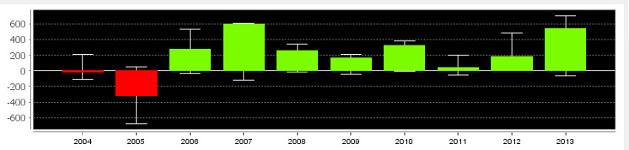
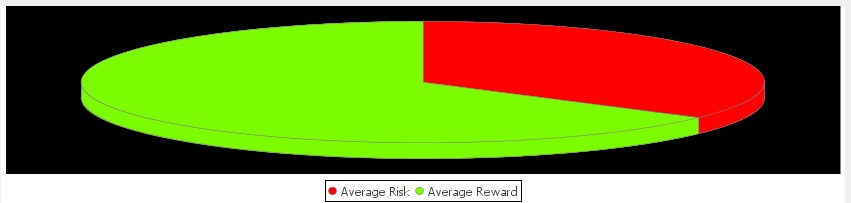
able to click through three separate charts, based on
which trade you currently have highlighted. These three
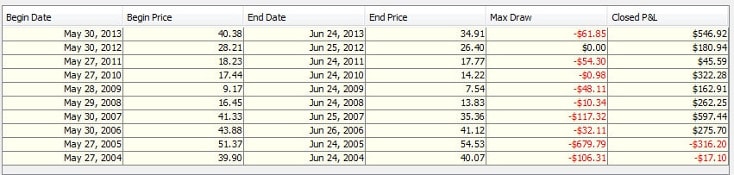
charts include an equity curve
showing the historical return
characteristics of the trade, a
histogram with year-over-year
profit and loss data, and a pie
chart that shows the average
risk and average reward of the
trade.
To provide an example of how
easy the software is to
navigate, I ran a simulation
that mined all of stocks in the
S&P 500, the Dow Jones
Composite, and the Nasdaq
100. This simulation mined all
trades in the month of May,
including both buy and sell
trades, which lasted at least 5
days but no more than 30 days,
and had a 95% success rate as
well as a minimum of 12 years
of historical data (see figure A-1). After clicking "Dig
Now!" it took approximately 40 seconds to mine
through all of the stocks and produced a total of 67,
with 45 of the results being sell trades and 27 buy trades
(see figure A-2). In order to find the most successful
trades I sorted the results so that the trades were ranked
in descending order with the most successful trades
listed first. You can also sort the results by any of the
other 31 criteria so that you can quickly filter through
the results and find the trades that your investment
criteria. Since I typically prefer short-term trades, over
long-term trades, but will sometimes trade for longer
time frames depending on what trading opportunities
are available, I sorted the results by clicking on the "Cal
Days" tab so that each trade was listed in order
according to the total number of days of each trade.
Looking over to the "Score" column, and seeing
multiple trades with green dots (which is the color of
the highest ranked trades and, by the way, makes it
really easy to find the most profitable trades) and even a
few with score of 5 (which is the highest numerical
score possible), I can quickly see that there are many
short-term trades to pick from. To screen the trades a bit
further I scanned the results for trades that covered
different time periods in the month and I also looked for
a mix of "Buy" and "Sell" entry orders as well, so that I
could find both
long and short
trading
opportunities. I
was able to find
8 trades that
were spread out
throughout the
entire month,
which will be
plenty of trades
for me since I
tend to have a
concentrated
portfolio with
only a few
trades at a time,
with five being
"Buy" (long)
positions and
three being
"Sell" (short)
positions. After
checking the
box next to each
of the trades and
clicking the
"Add Selected" button, I clicked on the "Step 2:
Portfolio" tab to create a portfolio of the trades that I
had selected. In the "Step 2: Portfolio" tab I am now
able to print either detailed information on each trade or
simply a short summary of all of the individual trades
that met my criteria. That's it! In a little less than 5
minutes I now have detailed information on 8 trades,
which I will trade in the month of May, that have a
historically high probability of success.
There are also two more important tabs that I should
quickly mention. If you click on the "Settings" tab you
can select the universe of stocks that you want the
software to mine through, which can simply be all
active stocks in each index or one of the individual
indexes (as I mentioned earlier, the index options
include the S&P 500, the Dow 30, and the Nasdaq 100).
The last tab is the "Education" tab and when you click
on this tab your browser will open and you will have
access to education material from the TradeMiner
website. Since education is one of the most important
aspects of successful investing, this is definitely a very
valuable feature of the software and it is
included in each of the TradeMiner
packages. TradeMiner for stocks,
specifically, has multiple training videos to
help you get started, multiple educational
videos, audio interviews with some of the
greatest traders of all time, educational PDF
lessons, webinars, and a TradeMiner
manual that makes it easy to quickly learn
the software inside and out. There are
definitely enough resources to help turn
anyone into a knowledgeable trader, and as Benjamin
Franklin once said, "An investment in knowledge
always pays the best interest."
In summary, TradeMiner is a great tool for any trader
who is looking to gain an investing edge by mining
through large amounts of historical stock information,
analyzing trends and cycles, in order to find potential
trading opportunities. Even though the TradeMiner
software is based on complex mathematical formulas
that allow the software to quickly mine, sort, and
organize large amounts of historical data, the simple
interface makes using the software so easy that anyone
can quickly learn how to navigate the software and be
finding winning trades in almost no time at all. By
giving each user the ability indentify the market trends
and cycles that tend to repeat themselves over time, the
TradeMiner software is definitely a must-have for any
trader, from beginning traders to seasoned
professionals, who is looking for a statistical edge in the
markets. [Click Here to learn more about TradeMiner.]
Figure A-1: A close-up screenshot of the allowable criteria that can be specified in TradeMiner.